






Job Time Management Software

Know What Every Job Really Takes

A shop that doesn’t know how long its jobs take guesses twice a day: once when it writes the quote and again when it books the bays. Torque360 job time management software records when every job starts and when it’s finished, so both calls start from real job time tracking. Trusted by 1,000+ repair shops across auto, truck, motorcycle, RV, and powersports.
  • Automatic start and finish stamps on each job

  • The real duration of every completed job

  • Actual time compared against your estimate

  • Job time kept separate from shift clock time

Job Time Management Software

How It Works?

How Does Job Time Tracking Work
in an Auto Repair Shop?

Job times scribbled on the repair order after the last car leaves are guesses dressed up as data. By then, nobody remembers whether the alternator took 90 minutes or two and a half hours. That’s the real problem behind how to track technician hours per job: the time has to be captured while the work happens, not reconstructed after.

Work Starts, the Timer Runs

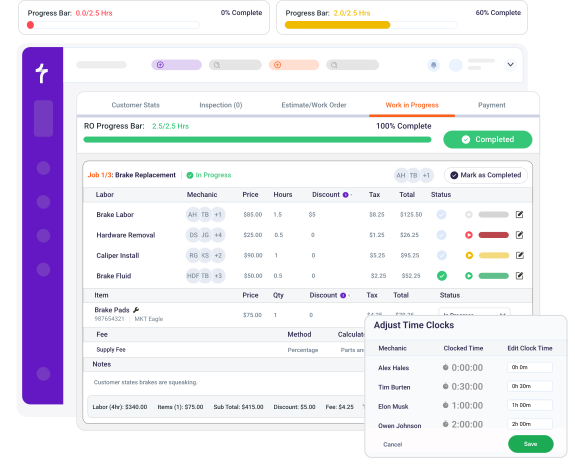
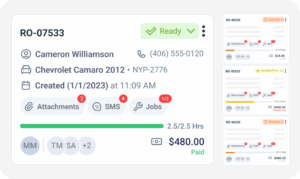
Work kicks off on a job, and its job timer starts running. The start time gets stamped the moment work begins.

Job Done, Timer Off

Close the job out as complete, and the timer halts and stamps the finish time. Nobody types a time in afterward.

See the Real Duration

Torque360 then shows the total time the repair actually took. That’s job duration tracking with no stopwatch needed.

Integrate Your Entire Workflow

What Is Job Time Management Software?

Job time management software, also called job time tracking software, measures how long each repair job takes and keeps that record for planning and pricing. It’s job tracking software for mechanics built around the job, because the job is the unit a repair shop actually sells.
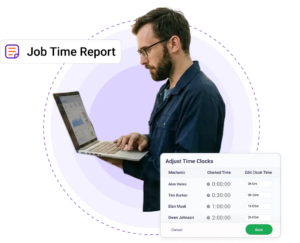
Clock time measures the shift: when a technician clocks in, when they clock out, and every hour in between. Job time measures the work: how long each repair took from start to finish. One describes a person’s day; the other describes a job. Mix them up, and you’ll judge a technician by one job’s numbers or a job by one technician’s day.

Pull up how long the work ran and set it against the hours on the estimate. Take a brake job quoted at 1.5 hours that comes in at 2.2: that’s 0.7 hours nobody paid for. One overrun is noise. The same overrun on every brake job is a quote that needs to go up. Price is from what the work takes in your bays, and margin stops leaking on the jobs you sell most.

Overbooking rarely starts with too many cars. It starts with promising pickup times the bays can’t hit, then spending the afternoon on apology calls. When you know how long your jobs really take, you plan the day around those numbers, stop stacking more work than the shop can finish, and keep cars rolling out when you said they would.

Efficiency compares the hours a job is paid for with the hours it took: flagged hours divided by actual job time. A job that flags 3.0 hours and takes 2.5 runs at 120%. Without real job time, the bottom half of that fraction is a guess, and so is every efficiency number built on it, including the ones you use in a performance review.

Job Time Tracking Comes With Starter

No add-on, no upgrade. Job time tracking is part of Starter, Torque360’s entry plan, so every job your shop runs is timed from your first day on the platform.

Built to Power Entire Auto Shop Operation

Why Choose?

Why Do Repair Shops Track Job
Time Inside Torque360?

Job time data only earns its keep when it’s complete, easy to reach, and backed by people who can help when a number looks off. Here’s why repair shops choose to track it in Torque360 instead of on paper, a whiteboard, or a spreadsheet.

No Separate Timer App

Job timing runs inside the platform your shop already uses for estimates and repair orders, so there’s no second app to log into and no export to stitch together.

Job Times From Anywhere

Torque360 is cloud-based, so you can review last week’s job durations from home on a Sunday night without driving to the shop.

Rated Where Shop Owners Look

Shop owners review Torque360 on G2, Capterra, and Trustpilot, so you can read what other shops say before you book a call.

Help in About 30 Seconds

Every plan includes chat, email, and phone support, with replies averaging 30 seconds between 7 AM and 4 PM Pacific.

How Does Job Time Management
Connect to the Rest of the Shop?

Job time covers the duration. The first two modules below set what a job should take; the rest answer the questions about people, status, and performance that job time leaves alone.

appointment-booking-widget

Book jobs, manage calendars, and reduce no-shows.

digital vehicle inspection software

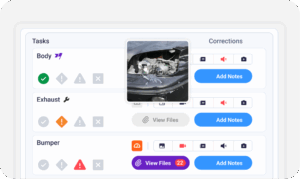
Capture photos and videos. Add notes and findings.

auto repair estimating software

Build accurate estimates with labor, parts, and pricing.

repair order software

Convert approved work into organized repair orders.

auto repair invoicing software

Generate invoices from completed labor and parts.

auto repair job board software

Track jobs, assign technicians, and monitor progress.

Which Repair Shops Use Job Time Management?

What a shop needs from a job timer depends on the work rolling through its bays. Here’s where job time pays off first in each kind of shop running on Torque360.

Mechanic Shop

Motorcycle Repair

Truck Repair

Oil Change

Tire Repair

Mobile Mechanics

In Their Own Words

What Do Shop Owners Say About Torque360?

Hear it from the people behind the counter. These owners run their bays, their front desk, and their paperwork on Torque360 every day, and here’s what they have to say about it.

Mamood, Owner at Chicago Express Auto Services
Chicago Express Auto Services

"We’re a walk-in shop, so cars come in all day without appointments. Keeping up with estimates, jobs and payments was hard to manage. Now everything from inspection to invoice is in one system, and we get customers back on the road much faster."

View Story
40%
Faster Vehicle Turnaround
1.5x
More Walk-in Cars Handled Daily
Rore, Owner at TuneUp Auto Repair
TuneUp Auto Repair

"Torque360 keeps our whole shop organized in one place. I can see where every job stands, track expenses and sales, and our customers get professional invoices and a text when their vehicle is ready."

View Story

10/10
Likelihood to Recommend
100%
Paperless Invoicing & Repair Tracking
Rore, Owner at Elite Auto Repair
Elite Auto Repair

"Juggling tires, repairs, and paperwork across separate processes, Elite moved everything into Torque360 and now runs faster with fewer errors."

View Story

3
Disconnected Workflows Unified
3
Manual Processes Automated
Clinton, Owner at Exclusive Detail Duluth
Exclusive Detail Duluth

"Before Torque360, we used a different platform, and that platform didn’t allow us to do any of the stuff that we needed to do. And their customer service was not very good at all"

View Story

9/10
Likelihood to Recommend
100%
Invoices Auto-Synced to QuickBooks
Andres, Owner at Moto Pops
MOTOPOPS

"Being able to send estimates directly to customers and receive instant approvals on their phones has dramatically sped up our repair process and improved communication."

View Story

3
Manual Processes Replaced
50%
Faster Estimate Approvals
Artur Pires, Owner at Mapgreen Motorsports
Mapgreen Motorsports

"Torque360 changed everything for us. On long projects, nothing gets lost anymore. Labor, parts, approvals, it’s all there. Since using it, I haven’t lost a single cent."

View Story

75%
Missed Revenue Prevented
2x
Increase in Project Visibility
Cauy Cuthbertson, Owner at Charles Garnett
Charles Garnett

“Torque360 has everything I was looking for. From scheduling and tracking jobs to QuickBooks Online integration and Torque Pay, it helps me stay organized.”

View Story

8+ Hrs
Saved on Daily Operations
100%
Same-Day Invoicing with TorquePay
Himel, Owner at Halal Auto Care
Halal Auto Care

"We were doing estimates and tracking jobs manually, and it caused delays and confusion. Now with digital estimates and invoicing, everything is faster and more organized."

View Story

50%
Faster Estimate & Job Processing
1.2x
Higher Customer Capacity
Ismail Khan, Owner at Tire & Wheel Xperts
Tire & Wheel Xperts

“Torque360 makes everything easy, efficient, and professional. Each invoice only takes about one to two minutes now. I recommend it 100%.”

View Story

1-2 min
Invoice Creation Time
95%
Automated Inventory Sync
Cauy Cuthbertson, Owner at Cutthroat Customs
Cauy Cuthbertson

"Torque360 helped us bring everything into one place. Jobs, parts, and invoices are easier to manage, and the shop runs more smoothly day to day. It gives us the structure we needed."

View Story
100%
Centralized Shop Workflows
2x
Boost in Operational Efficiency
Testimonials
See What Others Think of Torque360!
google
capterra
trustpilot
G2 Award Badge for User Love in Auto Repair Shop Software

Bring Your Shop Over. Leave the Retyping Behind.

Changing shop software sounds like weeks of re-entering customers by hand. It isn’t. Torque360’s migration team carries your customer list, vehicles, and parts across for you, while your advisors keep writing jobs in your current system. Switch on a Monday, and by Friday you’ll have a full week of real job times to look at.

  • Typical migration time: 3 to 7 business days

  • You review every record before go-live

  • Your parts list arrives ready to quote from

Frequently Asked Questions

Not directly. Hourly technicians are paid on clock time, and flat-rate technicians are paid on flagged hours. Job time is a management number: it tells you whether work is priced, booked, and performed the way you planned. Keeping it separate from pay also keeps it honest. Nobody pads a number that doesn’t touch their check.

Book time assumes a clean vehicle and a straight path to the part. Real jobs bring rusted fasteners, snapped bolts, diagnosis, research, and equipment setup that labor guides often leave out. None of that is the technician’s fault, and some of it is predictable by vehicle: a salted-road truck and a garage-kept sedan don’t take the same hour.

Divide the hours a technician spent on jobs by the hours they were clocked in. Nine hours on the clock with six hours of job time is about 67% productivity: three hours went somewhere other than a job, such as waiting on parts, waiting on approval, or cleanup. Job time supplies the top of that fraction, shift hours come from Employee Time Management, and productivity reports sit in Advanced Business Reporting.

No single number holds, because the same job changes with the vehicle, its condition, and what the inspection turns up. For a customer standing at the counter, a range beats a promise: give the low end if nothing else turns up and the high end if the inspection finds more; then call before you cross it.