Integrated Payments Software

Get Paid Before the Keys Leave the Counter

Every payment taken outside your shop software gets typed twice: once into the card machine, once onto the invoice. That’s how a $421 brake job turns into a $412 charge, and how Friday afternoons go to chasing customers who said they’d pay later. Auto repair payment processing in Torque360 runs on the repair order itself. With integrated payments, the total comes from the invoice, the customer pays at the counter or from a link on their phone, and the payment records itself against the job. Trusted by 1,000+ independent repair shops across auto, truck, motorcycle, RV, and powersports.
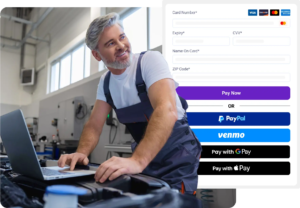
  • Card, tap, and Google/Apple Pay on a wireless counter terminal

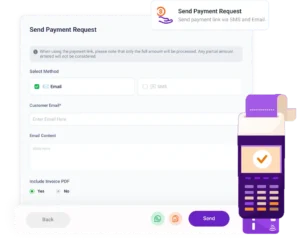
  • Pay-by-text links sent by SMS, email, or WhatsApp

  • PayPal, Venmo, cash, and check on the same job record

  • Every payment posted to the repair order and invoice

  • TorquePay deposits typically the next business day

Integrated Parts Ordering Software

How Does Auto Repair Payment Processing Work in Torque360?

How it Works

Getting paid should take less time than writing the invoice did. In Torque360, auto repair payment processing is the last step of the job, not a separate system with its own login.

Close the Repair Order

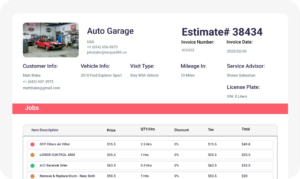
When the work is done, the repair order becomes the invoice, with parts, labor, fees, and tax already priced. Nobody does math at the counter. 

Choose How the Customer Pays

Pick the method on the invoice: card on the TorquePay terminal, a PayPal payment link, cash, or check. The method decides which of Torque360’s two payment rails handles the money.

Take the Payment

At the counter, the customer pays on the TorquePay terminal. Away from the counter, the customer opens the payment link and pays through PayPal’s checkout.

Let the Payment Post

The payment attaches to the job with the method and amount recorded, then flows into your payment reports.

Send the Receipt

Once the repair order is fully paid, Torque360 can send the invoice to the customer by email, SMS, or both. The customer has the paperwork before they reach the parking lot. 

Integrate Your Entire Workflow

What is Integrated Payment Processing for Auto Repair Shops?

Integrated payment processing for auto repair shops is card and digital payment processing that runs inside the shop management software. The amount comes from the repair order, the customer pays by card, link, cash, or check, and the payment is recorded on the job in the same system.
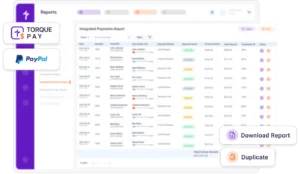
A standalone terminal knows only the number someone typed into it. It has no idea which repair order, which customer, or whether the job was already paid. So the deposit hits your bank as one lump with no RO numbers attached, and someone matches it to invoices by hand. Integrated payments start from the repair order instead, so the job reference travels with every payment into your reports.

Quick Checkout (POS), an auto repair POS system, is the counter screen for sales that never becomes a repair order. Integrated Payments is the money side of both. For a counter sale or a four-day engine job, the customer pays through the same terminal, and the payment lands in the same records. 

Because payment questions come back months after the job. A customer disputes a $1,380 charge with their card issuer or calls about the warranty on a water pump. With auto repair shop payment software built into the RO, the approved work, the invoice, and how and when it was paid open from one record. Without it, you’re digging through a terminal batch report and a filing cabinet. 

How Can Customers Pay an Auto Repair Shop With Torque360?

Customers pay in one of two places: at your counter or wherever they happen to be when the work is done. Torque360 covers both with two payment rails. TorquePay handles the counter. PayPal handles the link.

Credit card processing for auto repair shops at the counter runs through TorquePay on a wireless terminal. The advisor sends the repair order total to the terminal; the customer taps, inserts a chip, or swipes, and the keys go back across the counter. Contactless payments matter more than they sound: a customer who left their wallet in the other car can still pay by tapping a phone with Google Pay or Apple Pay.

Yes. Select PayPal on the repair order and send a payment link by text, email, or WhatsApp. The link opens PayPal’s checkout on a phone, tablet, or computer. That’s text to pay in practice: the car is paid for before anyone comes to pick it up. The shop connects its own PayPal Business account once, in Torque360’s settings, and setup details live on the PayPal integration page. 

Yes. The service advisor splits the invoice total in Torque360, and each payment logs against the same repair order. That covers the $1,900 timing belt job a customer wants spread across two cards or a bill a parent and a college student are sharing. The remaining balance stays visible until the last payment posts, so nobody marks the job paid after the first card clears.

What Happens to a Payment After the Customer Pays?

Taking the money is the quick part. What happens to the record afterward decides whether month-end takes an hour or a day.
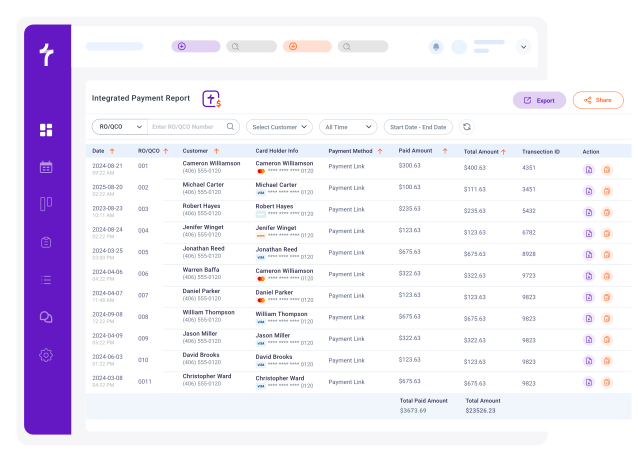
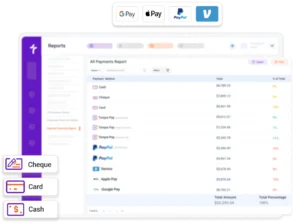
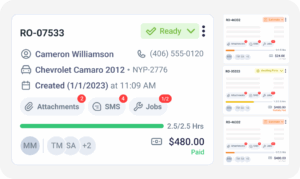
On the repair order and the invoice it belongs to, with the amount, the method, and, for TorquePay card payments, the transaction ID. Through the repair order, it also sits on the customer’s history, next to their past jobs. At closing time, the advisor can see which of the day’s jobs are still unpaid before the last customer walks out.

TorquePay deposits typically arrive the next business day, so a transmission job paid Thursday afternoon is usually in the bank Friday. That next-day funding matters most in the weeks a big parts invoice comes due. PayPal payments follow your own PayPal account’s payout schedule, because the shop keeps its own PayPal Business account. Cash and checks go to the bank the way your shop already handles them.

Start from the reports, not the bank statement. Each rail has its own Integrated Payments report, one for TorquePay and one for PayPal, and the All Payments report lists every transaction with its method, status, and RO reference. Refunds and voids carry their own statuses, so they never hide inside a net deposit. Money still owed, like fleet balances on terms, lives in Accounts Receivable.

Which Payment Setup Fits Your Shop?

Which rail you lean on depends on where customers are when the car is done. Use the Lobby-or-Link Rule: if the customer is standing in front of you, run the card on the terminal. If they aren’t, send the link.
When most customers wait in your lobby or come back to the counter to pay. Tire shops, quick lubes, and shops built on while-you-wait work fit here. There’s nothing to send and nothing to follow up on: the customer pays, takes the keys, and the job closes while they’re standing there. If your customers rarely leave before paying, the terminal alone covers you.

When the car is ready, and the customer isn’t there. Drop-off shops, fleet work, and mobile mechanics live here, along with any shop running after-hours key drops. A link sent with the pickup text gets paid on the customer’s lunch break, not at 5:55 PM with three people waiting at the counter. For a fleet account, it reaches the manager who never sets foot in the shop.

On other eligible plans, the $499 Payments Integration add-on covers both TorquePay and PayPal. TorquePay bills processing per transaction, and PayPal charges its own transaction fees, which Torque360 doesn’t set. Processing rates change, so current numbers aren’t printed here; check the pricing page or ask in the demo before comparing them with your current processor.

Your current contract, before anything else. Look for an early termination fee, an auto-renewal date, and whether your terminal is leased, since terminal leases are often a separate contract that keeps billing after the processing agreement ends. Then work out your effective rate: total fees divided by total card volume across your last three statements. That’s the number to compare, not the headline rate.

See Your Own Checkout Run in
Torque360

Bring a recent card processing statement and a typical repair order to the demo. You’ll see that job go from a closed RO to a card payment and a payment link, and leave knowing which rail your shop needs first.

Built to Power Entire Auto Shop Operation

Why Choose

Why Do Repair Shops Take Payments Inside Torque360?

See what changes at checkout when auto repair payment processing runs in the same software as the repair order.

Check the day’s payments from anywhere

Torque360 runs in the browser, so the owner can see what came in today from a laptop at home, not just the front desk.

A login for everyone who takes payments

Turbo and Supercharged put no limit on users, so the Saturday cashier never borrows the owner’s password to run a card.

No monthly processing fees

TorquePay charges per transaction, with no monthly fee and no long-term contract for your shop to work its way out of.

Help without leaving the screen

Live chat sits inside Torque360. An AI assistant answers instantly, and the team takes over from 7 AM to 4 PM Pacific.

How Does Integrated Payments
Connect to the Rest of the Shop?

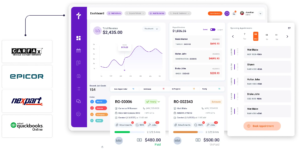
Auto repair payment processing touches every record below. Each payment starts in one and ends in another.
appointment-booking-widget

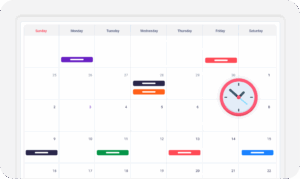
Book jobs, manage calendars, and reduce no-shows.

digital vehicle inspection software

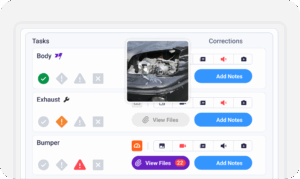
Capture photos and videos. Add notes and findings.

auto repair estimating software

Build accurate estimates with labor, parts, and pricing.

repair order software

Convert approved work into organized repair orders.

auto repair invoicing software

Generate invoices from completed labor and parts.

auto repair job board software

Track jobs, assign technicians, and monitor progress.

Which Repair Shops Use Integrated Payments?

Job sizes swing across shop types: a $40 tire patch, a spring motorcycle service, or a five-figure diesel or RV repair. Every one of them runs on the same Torque360 platform, so a payment works the same way whether the shop fixes cars, bikes, RVs, or trucks.

Mechanic Shop

Motorcycle Repair

Truck Repair

Oil Change

Tire Repair

Mobile Mechanics

In Their Own Words

How Are Repair Shops Getting Paid Faster
With Torque360?

Real shops using one connected system for customer records, approvals, and follow-up.

Clinton, Owner at Exclusive Detail Duluth
Exclusive Detail Duluth

"Before Torque360, we used a different platform, and that platform didn’t allow us to do any of the stuff that we needed to do. And their customer service was not very good at all"

View Story
9/10
Likelihood to Recommend
100%
Invoices Auto-Synced to QuickBooks
Andres, Owner at Moto Pops
MOTOPOPS

"Being able to send estimates directly to customers and receive instant approvals on their phones has dramatically sped up our repair process and improved communication."

View Story
3
Manual Processes Replaced
50%
Faster Estimate Approvals
Artur Pires, Owner at Mapgreen Motorsports
Mapgreen Motorsports

"Torque360 changed everything for us. On long projects, nothing gets lost anymore. Labor, parts, approvals, it’s all there. Since using it, I haven’t lost a single cent."

View Story
75%
Missed Revenue Prevented
2x
Increase in Project Visibility
Cauy Cuthbertson, Owner at Charles Garnett
Charles Garnett

“Torque360 has everything I was looking for. From scheduling and tracking jobs to QuickBooks Online integration and Torque Pay, it helps me stay organized.”

View Story

8+ Hrs
Saved on Daily Operations
100%
Same-Day Invoicing with TorquePay
Himel, Owner at Halal Auto Care
Halal Auto Care

"We were doing estimates and tracking jobs manually, and it caused delays and confusion. Now with digital estimates and invoicing, everything is faster and more organized."

View Story
50%
Faster Estimate & Job Processing
1.2x
Higher Customer Capacity
Shop owner video testimonial
Tire & Wheel Xperts

“Torque360 makes everything easy, efficient, and professional. Each invoice only takes about one to two minutes now. I recommend it 100%.”

View Story

1-2 min
Invoice Creation Time
95%
Automated Inventory Sync
Shop owner video testimonial
Cauy Cuthbertson

"Torque360 helped us bring everything into one place. Jobs, parts, and invoices are easier to manage, and the shop runs more smoothly day to day. It gives us the structure we needed."

View Story
100%
Centralized Shop Workflows
2x
Boost in Operational Efficiency

Switch Without Starting From Zero

Your customers, vehicles, and parts list move with you. Torque360’s migration team does the moving, and you go live only after you’ve checked your data, so the shop never spends a day without a working system.

  • Data migration support for customers, vehicles, and parts

  • No downtime: go live after you review your data

  • Onboarding and training on Turbo and Supercharged

  • Reviewed by shop owners on G2, Capterra, and Trustpilot

Frequently Asked Questions

Ask for the money when the car is ready, not when the customer shows up. Send a payment link with the pickup text, run cards on a terminal that already has the total, and post every payment to the repair order so nothing sits half-paid. Put your payment policy in writing at drop-off, too: balance due at pickup, keys released at zero. Customers rarely argue with a rule they agreed to that morning.

Through the same software that writes the repair order. Put any option through the Re-Key Test in the demo: close a repair order, run a card, and ask where that payment now shows up. If the rep can show it on the repair order, the invoice, and the payments report without anyone typing the amount a second time, that’s integrated auto repair payment processing. If not, you’re buying a second system.

Send a payment link instead. Reading a card number over the phone means someone at your counter writes it down or types it, and that’s the card data you least want sitting on a notepad by the register. Text or email the link while the customer is still on the line, and they enter their own card details on PayPal’s checkout.

TorquePay processes cards through a PCI DSS-compliant payment gateway, and card data is captured at the terminal rather than typed into the counter computer. PayPal links send the customer to PayPal’s hosted checkout, so card details never pass through your shop’s screens. Your shop still carries its own PCI obligations, which apply to every business that takes cards.

A computer with a web browser runs Torque360, since the platform is cloud-based. Taking cards in person needs the TorquePay wireless terminal. Payment links need no extra hardware at all, because the customer pays on their own device. For TorquePay, plan on the Supercharged plan or the Payments Integration add-on.