PartsTech Integration

Order Parts and Tires From Suppliers Without Leaving Torque360

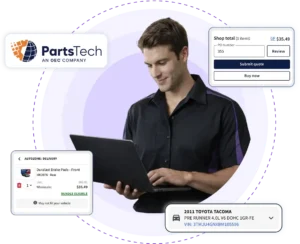
Toggling between supplier tabs slows every repair order. Torque360’s PartsTech integration lets your shop launch PartsTech directly from the repair order to search for parts and tires from multiple suppliers in a single lookup, compare live wholesale pricing and delivery times, and place orders. Once submitted, selected parts automatically sync back to the estimate or repair order without manual entry. Trusted by 1,000+ independent repair shops across auto, truck, motorcycle, RV, tire, and powersports.
  • Search parts and tires in one PartsTech lookup

  • Compare auto parts prices across suppliers

  • Order parts without leaving the repair order

  • Free PartsTech account, included in your Torque360 plan

How It Works?

How Does the Torque360 PartsTech
Integration Work?

Connect PartsTech Account to Torque360

Create a free PartsTech account, then connect it inside Torque360 in a few steps. Once connected, service advisors can launch PartsTech directly from the repair order to search suppliers, compare parts and tires, and place orders.

Search Parts and Tires in One Lookup

Search aftermarket parts, OE parts, and tires from all your connected suppliers in a single lookup. Compare pricing, availability, and delivery times side by side instead of opening each supplier site on its own.

Submit a Quote or Add Parts to the Repair Order

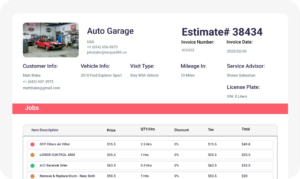
Import PartsTech parts into estimate or RO. Use Submit Quote to price the job and get approval first, or add parts from PartsTech to repair order when the work is already confirmed. Part numbers, pricing, and quantities fill in automatically.

Buy Now and Track Delivery

Place the order through your connected PartsTech account with Buy Now, and keep the ordered parts linked to the RO. Compare PartsTech delivery timelines per supplier and track order status from Torque360, so your team knows when parts will arrive.

Integrate Your Entire Workflow

How Does the PartsTech Integration Reduce Parts Ordering Time?

The PartsTech integration reduces parts ordering time by letting service advisors launch PartsTech directly from the repair order. Search multiple suppliers, compare pricing and availability, place the order in PartsTech, and automatically sync selected parts back into the estimate or repair order. Shops can save an average of 15 minutes per repair order.
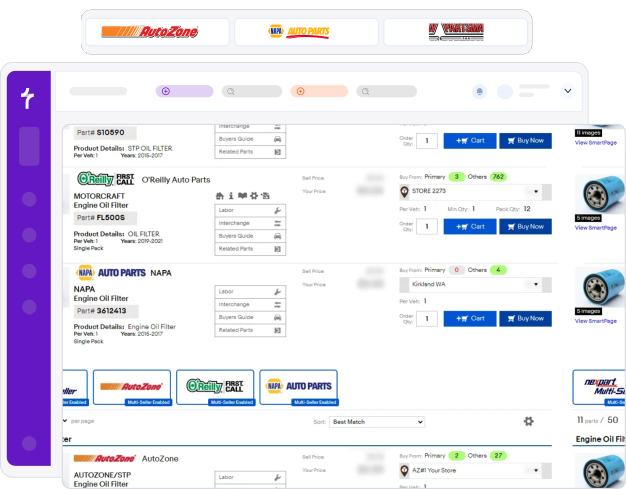
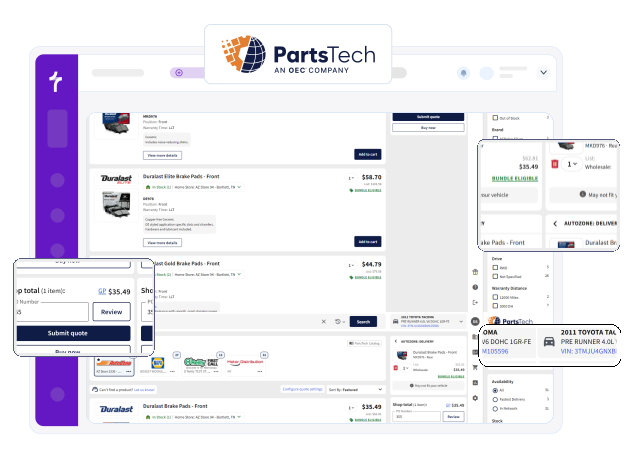
One lookup shows parts and tires from every connected supplier at once. Sourcing both from the same search means your advisor isn’t switching to a separate tire tool to finish the same job.

See pricing, availability, and delivery times from multiple suppliers side by side in a single search. Comparing suppliers on one screen helps your advisor pick the right part at the right price without checking each store separately.

Live PartsTech wholesale parts pricing and stock show on screen, so there’s no phoning store after store to check what’s available. Your advisor quotes from current supplier data instead of guessing or waiting on a callback.

Which Suppliers Can I Order From Through PartsTech?

Through PartsTech, your shop can order from a network of 300+ parts and tire suppliers across 30,000+ locations, according to PartsTech. That includes recognizable retail names, national warehouse distributors, OE dealers, and the local suppliers you already buy from.
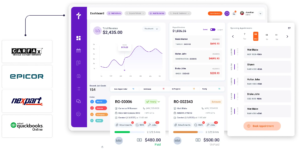
PartsTech connects to well-known suppliers such as NAPA, AutoZone, and Advance Auto Parts, alongside warehouse distributors like Worldpac and U.S. AutoForce. You order from recognizable and local suppliers in the same lookup instead of managing a separate login for each one. Available suppliers depend on your area and the accounts you connect to.

Search both aftermarket and OE parts, and order OE parts directly from dealers where available. Covering both means your advisor can match the customer’s budget and the vehicle’s needs from one search.

Connect an unlimited number of your preferred parts and tire suppliers to your PartsTech account for free. Your existing supplier relationships and commercial pricing come with you, so the switch doesn’t cost you your local accounts.

Search compatible parts using the vehicle’s VIN, license plate, or year, make, model, and engine where supported. Matching parts to the exact vehicle before ordering helps get the right part the first time.

Keep PartsTech Parts and Tire Ordering Connected to
Every Repair

Connect your free PartsTech account to Torque360 and manage parts search, tire ordering, and repair information from one system. Spend less time switching between supplier sites and more time keeping repairs moving.

Built to Power Entire Auto Shop Operation

Why Repair Shops Choose Torque360’s
PartsTech Integration

Repair shops choose Torque360’s PartsTech integration because it does more than link two systems. It keeps parts and tire ordering inside the repair workflow. That means faster sourcing, fewer manual steps, and better visibility for the whole team.

Speed Up Daily Operations

Searching suppliers, comparing prices, and ordering parts and tires from one system cuts time spent jumping between supplier sites. Save an average of 15 minutes per RO, freeing your team to complete more work.

Improve Team Productivity

Less time hunting for parts and retyping details gives service advisors more time to manage repair orders and talk to customers. The whole front desk works from one screen instead of several.

Increase Parts and Tire Visibility

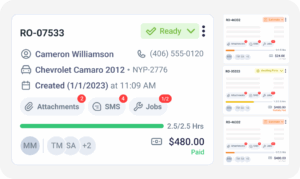
Keeping ordered parts and tires linked to the repair order helps advisors and technicians see what’s ordered and what’s still coming. Shared visibility makes it easier to coordinate the next stage of the repair.

Keep Costs Predictable

A PartsTech account is free, and the integration is included with your Torque360 plan, so there’s no separate parts-ordering subscription. Wholesale auto parts ordering for shops helps protect the margin on every job.

How Does the PartsTech Integration
Connect to the Rest of Your Repair Workflow?

Ordering parts is one step in the repair, not the whole job. Parts and tires ordered through PartsTech stay connected as work moves from estimate to RO, technician assignment, invoicing, and reporting, so every stage uses the same current parts information. Advisors quote in the estimate, order inside the RO, technicians see assigned parts in the technician app, and part costs flow through to the invoice without re-entry.
appointment-booking-widget

Book jobs, manage calendars, and reduce no-shows.

digital vehicle inspection software

Capture photos and videos. Add notes and findings.

auto repair estimating software

Build accurate estimates with labor, parts, and pricing.

repair order software

Convert approved work into organized repair orders.

auto repair invoicing software

Generate invoices from completed labor and parts.

auto repair job board software

Track jobs, assign technicians, and monitor progress.

Built for Every Type of Repair Shop

Every repair shop depends on fast, accurate parts and tire ordering to keep bays full. Torque360’s PartsTech integration helps auto repair shops source parts and tires from one connected platform. Multi-tech shops running several bays get the most from one-lookup ordering, since a single advisor can source parts and tires for many jobs without switching tools.

Mechanic Shop

Motorcycle Repair

Truck Repair

Oil Change

Tire Repair

Mobile Mechanics

Faster Parts Sourcing. Tires and Parts Together.
Fewer Delays.

Repair shops use Torque360 to source parts and tires from one workflow, save time on parts ordering, and keep repairs moving with fewer wrong-part delays. By keeping ordering aligned with the repair process, shops build more accurate estimates and give customers a clearer picture before work begins.


“Torque360 changed everything for us. On long projects, nothing gets lost anymore. Labor, parts, approvals, it’s all there. Since using it, I haven’t lost a single cent.”

— Artur Pires, Co-Owner

75%

Missed Revenue Prevented

2x

Increase in Project Visibility

“Torque360 helped us bring everything into one place. Jobs, parts, and invoices are easier to manage, and the shop runs more smoothly day to day. It gives us the structure we needed.”

— Cauy Cuthbertson, Owner 

100%

Centralized Shop Workflows

3x

Boost in Operational Efficiency

“We were doing estimates and tracking jobs manually, and it caused delays and confusion. Now with digital estimates and invoicing, everything is faster and more organized.”

— Himel, Owner

50%

Faster Estimate & Job Processing

1.2x

Higher Customer Capacity

Testimonials
Users Who Integrated PartsTech into Their Workflows
google
capterra
trustpilot
G2 Award Badge for User Love in Auto Repair Shop Software

Connect PartsTech to Torque360 and Order Parts and Tires Faster

Keep parts search, tire ordering, and repair information together in one system. With PartsTech connected to Torque360, your team spends less time managing parts and more time keeping repairs on schedule.

  • Search parts and tires from all your suppliers in one lookup

  • Order parts and tires directly from the repair order

  • Compare live wholesale pricing and delivery times in PartsTech

  • Keep ordered parts and tires linked to the RO and invoice

Frequently Asked Questions

Yes. Torque360 integrates with PartsTech, allowing your service advisor to launch PartsTech directly from the repair order. Search, compare, and order parts and tires within PartsTech, then automatically sync selected parts back to the estimate or repair order without manual entry.

Launch PartsTech directly from the repair order to search multiple suppliers, compare pricing and availability, and place your order. Once submitted, selected parts automatically sync back into the estimate or repair order. According to PartsTech, shops save an average of 15 minutes per repair order.

Yes. See PartsTech real-time pricing and availability, and delivery times from your connected suppliers side by side. Comparing suppliers on one screen helps your advisor choose the right part at the right price without checking each supplier separately.

Yes. PartsTech connects to 300+ parts and tire suppliers, including recognizable names such as NAPA, AutoZone, and Advance Auto Parts, plus warehouse distributors like Worldpac. Available suppliers depend on your area and the accounts you connect to, and you order from them in the same lookup.

Yes. PartsTech includes 50+ tire suppliers through the TireConnect network, so you can source tires and parts together in the same PartsTech multi-supplier search. Ordering tires alongside parts keeps tire jobs on the same workflow as mechanical repairs.

See live wholesale pricing and availability on screen instead of phoning store after store. Torque360’s PartsTech integration shows current supplier pricing and stock while you search, so your advisor can quote from real data without waiting on a callback.

A PartsTech account is free, and the PartsTech integration is included with Torque360 plans starting at $99.99/month or $89.99/month billed annually, at no additional charge. That means no separate parts-ordering subscription. You connect your free PartsTech account and start ordering inside the repair order.

Yes. You’ll need a free PartsTech account to use the integration. Create the account, connect it inside Torque360, and your advisors can search, compare, and order parts and tires from the repair order.

Through PartsTech, you can order from 300+ parts and tire suppliers across 30,000+ locations, according to PartsTech. That includes retail names like NAPA, AutoZone, and Advance, warehouse distributors such as Worldpac and U.S. AutoForce, tire suppliers, and OE dealers, plus the local suppliers you connect with.

Yes. Use Submit Quote to pull parts into an estimate and cost the job before buying, then use Buy Now once the customer approves. Pricing the job first helps with job costing and approvals and avoids ordering parts you may not need.

Connect your free PartsTech account inside Torque360 in a few steps. Once connected, your advisors can launch PartsTech from the repair order, compare suppliers side by side, place orders, and automatically sync selected parts back into the estimate or repair order.

The PartsTech integration is included with Torque360 plans starting at $99.99/month. PartsTech and Nexpart integrations come with the Starter plan, while Epicor Repair Time Guides & Parts Ordering are available with the Turbo plan and above.

PartsTech is a free parts and tire procurement platform for auto repair shops headquartered in Boston, Massachusetts. It connects shops to 300+ parts and tire suppliers across 30,000+ locations, according to PartsTech.

PartsTech is owned by OEConnection (OEC), which acquired PartsTech in February 2025. PartsTech continues to operate as a parts and tire procurement platform for auto repair shops.