Auto Repair Profitability Reporting

Track, Analyze, and Grow Your Auto Repair Business Profit

A full schedule can still lose money. Revenue tells you the bays were busy. It doesn’t tell you which jobs covered parts and labor and which quietly gave away margin. Auto repair profitability reporting closes that gap. Torque360 tracks revenue, labor, and parts usage in real time and measures every repair order against its cost, so you can control your shop’s financial performance with reports by job, technician, service type, and time period. Trusted by 1,000+ repair shops across auto, truck, motorcycle, RV, and powersports.

  • Revenue and costs on every repair order

  • Labor and parts margins by job and service

  • Hours, productivity, and revenue per technician

  • Profit by service, repair type, or time period

  • Generate daily, weekly, or monthly reports

Auto Repair Profitability Reporting

How It Works?

How Do You Track and Improve
Auto Repair Shop Profitability?

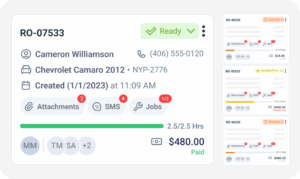
Track profit where it’s made: on the repair order. Torque360’s auto repair profitability reporting builds from the revenue, labor, and parts your team already records on each job, so the numbers exist before anyone asks for them. Then comes the part that’s easiest to skip: acting on what the numbers say. 

Put Every Job on Its Repair Order

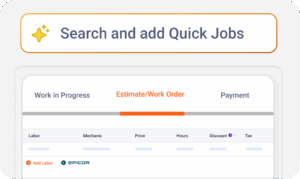
Every labor line, part, and service belongs on the repair order as the job is quoted and worked. The report reads that record, so if it went into the car, it goes on the repair order, even the part grabbed off the shelf at 4:55.

Start With the Week’s Repair Orders

Each week, begin with individual jobs. Look for the ones whose profit doesn’t match their size, and ask whoever wrote them what happened while the job is still fresh enough for anyone to remember the details.

Move From Jobs to Patterns

Then step back to services and technicians. One bad job is noise. The same service or the same name turning up week after week is a pattern, and patterns are what pricing and staffing decisions should rest on.

Change One Thing, Then Check

Act on what repeats, one change at a time, then read the next month against this one. If the number moved, the change worked. If it didn’t, the cause was somewhere else, and the report just saved you from guessing twice.

Integrate Your Entire Workflow

Where Is Your Auto Repair Shop’s Money Going?

Into jobs that earn and jobs that don’t, and a sales total can’t tell them apart. Auto repair profitability reporting can be done because it sets the revenue on each repair order against the parts and labor behind it. Torque360 automotive business profit tracking keeps those numbers current in real time, so an underpriced job caught this afternoon gets fixed on the next quote, not at month-end.
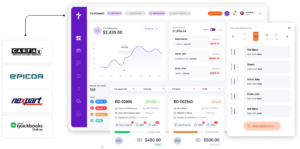
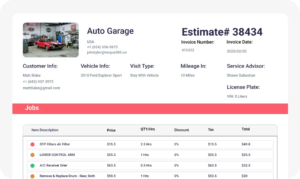
The detailed revenue and cost breakdown weighs each repair or service against its associated costs, with your revenue, labor, and parts margins in view. Two jobs can bill the same and earn very differently: a $900 alternator job built on a $480 part can clear less than a $900 electrical diagnosis that’s mostly labor. Job by job, that gap shows where bay time and advisor attention should go.

Quick profitability summaries show the profit on each service and repair type, which is where a healthy shop-wide margin stops hiding the service line that loses money every time it’s sold. The oil change may bring in a car every hour and earn little per visit, while brake work carries the month. When the schedule fills up, weigh each service’s profit against the bay time it ties up.

Torque360’s mechanic shop performance report tracks productivity, hours worked, revenue per technician, and job completion rates. Read together, they separate effort from output. A tech with 45 hours worked and revenue that looks like a 30-hour week is worth a conversation, often about parts or approvals rather than effort. The same numbers show who to reward and whether the shop needs another technician or a better workflow.

No. The profitability reports use simplified dashboards and clear summaries built around what matters most: what was billed, what it cost, and what’s left. Owners, managers, and technicians each get numbers they can act on, not a wall of raw data. If you can read a repair order, you can read the report, and most of the shop already can.

Find Out Which Jobs Paid for Themselves 

In a demo, we’ll walk through the revenue and cost breakdown, technician performance, and profitability summaries. Bring one question you can’t answer today, like which service you carried last month.

Built to Power Entire Auto Shop Operation

Why Choose?

Why Do Repair Shops Track Profitability
Inside Torque360?

Here’s what shops get when profit is measured on the same repair orders the counter already writes.

No Month-End Spreadsheet

Revenue, labor, and parts come straight from the repair orders, so nobody exports, pastes, and reconciles to learn what the month earned.

Margins From Anywhere

Torque360 runs in the cloud, so the profitability report opens on a laptop at home as easily as on the shop computer.

One Record, Estimate to Report

The labor and parts priced on the estimate become the repair order the report reads, so what you quoted and what you measure come from the same lines.

Help in About 30 Seconds

Live chat, email, and call support come with every plan, backed by a 30-second average response time. Support hours run 7 AM to 4 PM Pacific.

What Connects to Profitability Reporting?

The profitability report reads the repair orders your team writes. The first five modules below are where revenue, parts, and labor get onto those repair orders. The last three answer the money questions this report leaves alone.
appointment-booking-widget

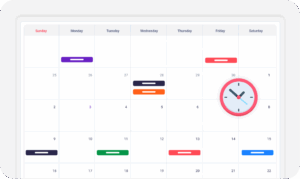
Book jobs, manage calendars, and reduce no-shows.

digital vehicle inspection software

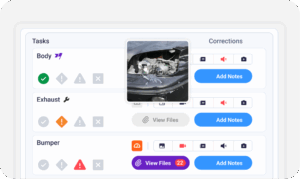
Capture photos and videos. Add notes and findings.

auto repair estimating software

Build accurate estimates with labor, parts, and pricing.

repair order software

Convert approved work into organized repair orders.

auto repair invoicing software

Generate invoices from completed labor and parts.

auto repair job board software

Track jobs, assign technicians, and monitor progress.

Which Repair Shops Use Auto Repair Profitability Reporting?

Where the margin comes from changes with the work. Parts-heavy shops live or die on the parts margin. Labor-heavy shops turn first to technician productivity and revenue per tech. Shops running long builds need profit tracked per repair order, because one overrun can eat a week of margin. Same Torque360 platform, same report, a different first question.

Mechanic Shop

Motorcycle Repair

Truck Repair

Oil Change

Tire Repair

Mobile Mechanics

In Their Own Words

How Are Repair Shops Running
Their Numbers on Torque360?

Each of these shops came to Torque360 with a different problem. What they share is the fix: every job’s labor and parts on one record, so the owner can see where the money went.
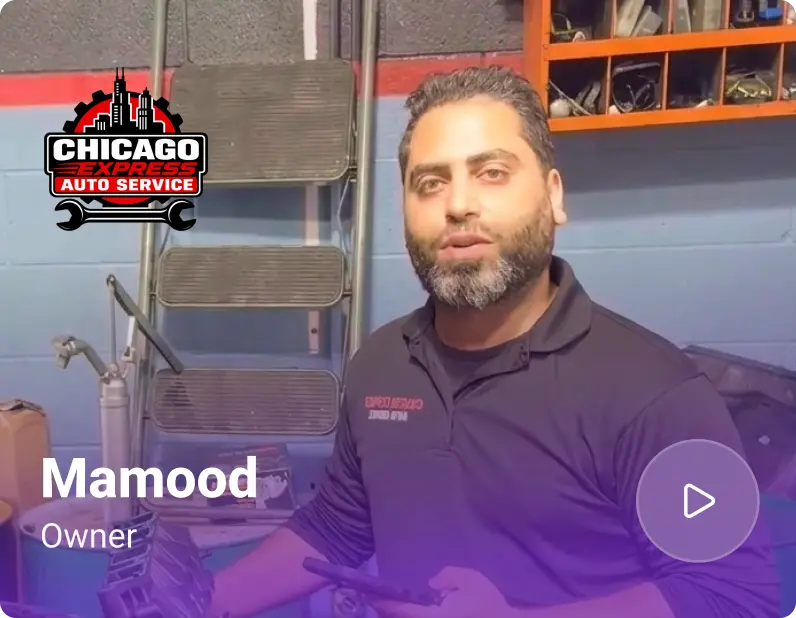
Mamood, Owner at Chicago Express Auto Services
Chicago Express Auto Services

"We’re a walk-in shop, so cars come in all day without appointments. Keeping up with estimates, jobs and payments was hard to manage. Now everything from inspection to invoice is in one system, and we get customers back on the road much faster."

View Story
40%
Faster Vehicle Turnaround
1.5x
More Walk-in Cars Handled Daily
Rore, Owner at TuneUp Auto Repair
TuneUp Auto Repair

"Torque360 keeps our whole shop organized in one place. I can see where every job stands, track expenses and sales, and our customers get professional invoices and a text when their vehicle is ready."

View Story

10/10
Likelihood to Recommend
100%
Paperless Invoicing & Repair Tracking
Rore, Owner at Elite Auto Repair
Elite Auto Repair

"Juggling tires, repairs, and paperwork across separate processes, Elite moved everything into Torque360 and now runs faster with fewer errors."

View Story

3
Disconnected Workflows Unified
3
Manual Processes Automated
Clinton, Owner at Exclusive Detail Duluth
Exclusive Detail Duluth

"Before Torque360, we used a different platform, and that platform didn’t allow us to do any of the stuff that we needed to do. And their customer service was not very good at all"

View Story

9/10
Likelihood to Recommend
100%
Invoices Auto-Synced to QuickBooks
Andres, Owner at Moto Pops
MOTOPOPS

"Being able to send estimates directly to customers and receive instant approvals on their phones has dramatically sped up our repair process and improved communication."

View Story

3
Manual Processes Replaced
50%
Faster Estimate Approvals
Artur Pires, Owner at Mapgreen Motorsports
Mapgreen Motorsports

"Torque360 changed everything for us. On long projects, nothing gets lost anymore. Labor, parts, approvals, it’s all there. Since using it, I haven’t lost a single cent."

View Story
75%
Missed Revenue Prevented
2x
Increase in Project Visibility
Cauy Cuthbertson, Owner at Charles Garnett
Charles Garnett

“Torque360 has everything I was looking for. From scheduling and tracking jobs to QuickBooks Online integration and Torque Pay, it helps me stay organized.”

View Story

8+ Hrs
Saved on Daily Operations
100%
Same-Day Invoicing with TorquePay
Himel, Owner at Halal Auto Care
Halal Auto Care

"We were doing estimates and tracking jobs manually, and it caused delays and confusion. Now with digital estimates and invoicing, everything is faster and more organized."

View Story

50%
Faster Estimate & Job Processing
1.2x
Higher Customer Capacity
Ismail Khan, Owner at Tire & Wheel Xperts
Tire & Wheel Xperts

“Torque360 makes everything easy, efficient, and professional. Each invoice only takes about one to two minutes now. I recommend it 100%.”

View Story

1-2 min
Invoice Creation Time
95%
Automated Inventory Sync
Cauy Cuthbertson, Owner at Cutthroat Customs
Cauy Cuthbertson

"Torque360 helped us bring everything into one place. Jobs, parts, and invoices are easier to manage, and the shop runs more smoothly day to day. It gives us the structure we needed."

View Story
100%
Centralized Shop Workflows
2x
Boost in Operational Efficiency

Make Next Month Your Baseline

Your customers, vehicles, and parts list move over with help from Torque360’s migration team, and you review the data before anything goes live. Past repair orders aren’t part of the standard migration, so your profit history starts at go-live. Switch on the first of a month, and every report after that starts from a full month of clean numbers.

  • Margin on every repair order, updated in real time

  • Which services carry your margin and which don’t

  • Technician performance that separates effort from output

  • Seasonal patterns to plan staffing and parts around

Frequently Asked Questions

Revenue minus parts cost minus labor cost is the repair order’s gross profit; divide that by revenue for the margin. A $1,000 repair order with $350 in parts cost and $250 in labor cost leaves $400, a 40% margin. Run the same math on just the labor lines or just the parts lines, and you have labor margin and parts margin. Torque360’s profitability reports show those margins by job and service type.

Often because volume is covering for thin margins. The common leaks: parts priced too close to cost, discounts given to close the sale, comebacks redone for free, and low-margin work filling bays that could hold better jobs. Most show up as repair orders that billed well and earned little. Find the leak before adding cars. More volume at a thin margin is just more work.

Because they measure different things, the profitability report shows what the work earned after parts and labor. Your P&L, built in your accounting software, also takes out rent, insurance, utilities, and every other cost that isn’t tied to one job. Expect the report to run higher. If the gap widens while overhead holds steady, look for costs that never made it onto a repair order.

Markup is what you add on top of cost; margin is what you keep out of the price. A part that costs $100 and sells for $150 carries a 50% markup but a 33% margin, because the $50 profit is measured against $150. Mix them up, and a shop that thinks it’s earning half on parts is earning a third. Set prices with markup, and judge results by margin.

Yes, for a different reason than in a big shop. A solo owner is the technician, the service writer, and the bookkeeper, so nobody else is there to notice a service line losing money. A weekly look at margin by service does the noticing instead. What a one-person shop can skip is the technician comparison: with one tech, revenue per technician is just revenue.