Torque360 Auto Repair Shop Software Features

Everything You Need to Run Your Auto Repair Shop in One Connected Platform

Torque360 is cloud-based auto repair shop software that brings inspections, scheduling, estimates, repair orders, invoicing, payments, inventory, and reporting into one connected workflow. Every feature is built to work with the next, so jobs move from booking to paid invoice without manual handoffs or duplicate data entry.
  • 20+ features in one connected platform

  • DVI, scheduling, estimates, invoicing, POS

  • Real-time parts, labor, and pricing data

  • Built for independent shops & specialty repair

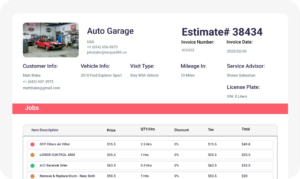
auto repair shop estimate software

How Torque360 Connects Your Entire Shop Workflow

Most shops run on 4-5 disconnected tools. Torque360 replaces them with a single system in which every feature feeds into the next. Bookings become inspections, inspections become estimates, estimates become repair orders, and repair orders become paid invoices, all without re-entering data.

Book the Job

Customers schedule online, or staff book from the calendar.

Inspect the Vehicle

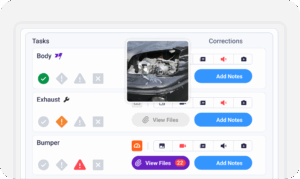
Technicians run a DVI with photos, videos, and notes.

Build the Estimate

Quote labor rates and parts with live pricing data.

Run the Repair Order

Approved estimates convert to ROs with one click.

Get Paid

Invoice, accept payment, and close the job from one screen.

auto repair estimate software

Revenue Growth Features

Win more approvals, recover lost work, and turn one-time customers into repeat business. These auto repair shop software features help shops capture revenue they were already leaving on the table.

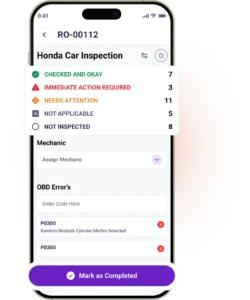
Run digital inspections with photos, videos, voice notes, and concern-cause-correction findings. Customers see exactly what needs work, which increases approval rates for repairs.

Bring customers back automatically. Send service-due reminders, follow-ups, and seasonal campaigns by text or email so your bays stay full without manual outreach.

Create and run targeted review campaigns to collect more Google reviews from satisfied customers. Strong reviews boost your local search ranking and attract new customers without extra ad spend.

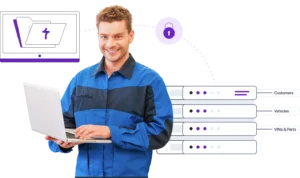
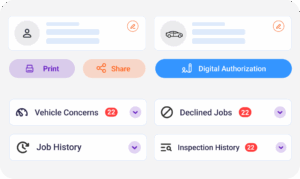
Keep track of your customers and their vehicles in one place. Access service history, past payments, declined work, and communication logs so every interaction is informed and consistent.

Process walk-in sales and parts checkout fast. The built-in automotive POS handles parts, services, taxes, and payments in a single screen.

Operational Efficiency Features

Cut admin time, prevent duplicate entry, and keep every job moving. These features replace the spreadsheets, sticky notes, and group chats that slow most shops down.

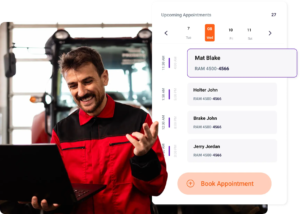
Book jobs through a calendar or let customers schedule online through the booking widget. Send automatic reminders to reduce no-shows and keep bays full.

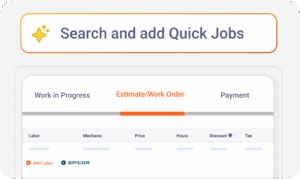
Build accurate estimates in minutes using VIN lookup, canned services, live parts pricing, and Epicor labor guides. Send by text or email for digital approvals.

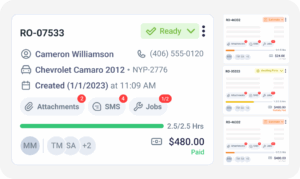
Convert approved estimates into structured repair orders with one click. Track parts, labor, technician assignments, and job status in real time from any device.

Generate professional invoices from completed work with no re-entry. Add discounts, taxes, fees, and shop branding. Send by email or print directly from the system.

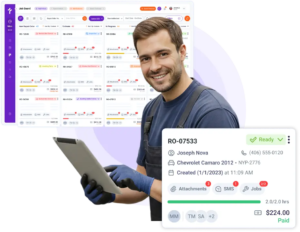
See every active job in one view. Track status from check-in to checkout, assign technicians, and spot delays before they slow your shop down.

Give technicians a mobile app for time tracking, job updates, and clock-in/clock-out. Work moves forward even when they’re under the hood, not at a counter.

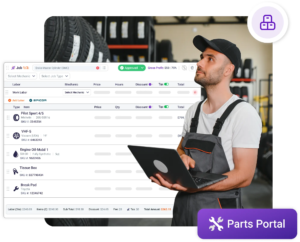
Order parts from PartsTech, NexPart, and Epicor without leaving Torque360. Pricing, availability, and order status sync directly into the active job.

Appointment & Service Reminders
Auto Parts Inventory Management Software

Live Analytics Features

Get paid faster, give customers more ways to pay, and keep cash flow predictable. Every payment method ties back to the invoice, so reporting stays clean.

Look up factory labor times from Epicor by Mitchell1 inside every estimate. Quote consistently, protect margins, and stop guessing on job times.

Track parts in real time. Set reorder points, monitor part costs, and connect inventory to repair orders so stock levels stay accurate.

Track billable hours, technician clock-in/out, and time spent per job. Compare clocked hours against billed hours to find labor leakage and improve productivity.

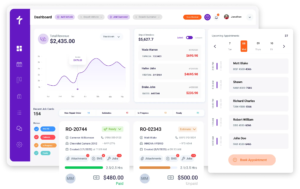
Track total sales, repair orders, invoiced revenue, technician productivity, and shop performance with real-time Day End reporting from any device.

See true job-level profit with breakdowns of parts cost, labor cost, discounts, and margins. Find your most profitable services and double down on them.

Monitor collected payments, outstanding invoices, and accounts receivable in one view. Know exactly where every dollar is across your shop.

Customer Experience Features

Stop running your shop on guesswork. Real-time dashboards show what’s working, what’s not, and where revenue is hiding so you can make decisions backed by data.

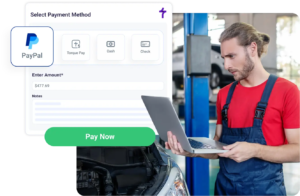
Accept credit cards, debit, and digital wallets in person or online. All transactions sync to the invoice and reporting, so your books stay accurate.

Send repair updates, share estimates, and get approvals by text, all from inside Torque360. Every message thread against the customer record.

Send automated SMS and email reminders before every appointment without any manual follow-up. Your bays stay full, and your schedule stays predictable.

Close repair orders without requiring immediate payment and track every outstanding balance in one view. Deferred amounts sync automatically to your sales and profit reports.

Track technicians’ clock-in, clock-out, breaks, and job-specific hours from a single dashboard. Link time directly to repair orders for precise labor costing.

Transfer your full database: customers, vehicles, parts, and suppliers, from your current system into Torque360 before you go live. No downtime. No records lost during the switch.

auto repair estimate software

Switch to Torque360 with Zero Data Loss

Already running another shop management system? Our Data Migration team moves your customers, vehicles, parts, and supplies into Torque360 for you. No spreadsheets to clean up, no records lost, no downtime for your shop.

  • Customers and vehicle history transferred intact

  • Parts and supplies catalog imported

  • Mapped to your existing workflow before launch

  • Hands-on support from a real migration specialist

Integrate Your Entire Workflow

What Happens When Shops Switch to Torque360?

Independent repair shops, custom garages, and multi-bay operations use Torque360 to centralize workflows, speed up job processing, and prevent revenue loss without adding headcount or switching tools mid-job.


“Torque360 changed everything for us. On long projects, nothing gets lost anymore. Labor, parts, approvals, it’s all there. Since using it, I haven’t lost a single cent.”

— Artur Pires, Co-Owner

75%

Missed Revenue Prevented

2x

Increase in Project Visibility

“Torque360 helped us bring everything into one place. Jobs, parts, and invoices are easier to manage, and the shop runs more smoothly day to day. It gives us the structure we needed.”

— Cauy Cuthbertson, Owner 

100%

Centralized Shop Workflows

3x

Boost in Operational Efficiency

“We were doing estimates and tracking jobs manually, and it caused delays and confusion. Now with digital estimates and invoicing, everything is faster and more organized.”

— Himel, Owner

50%

Faster Estimate & Job Processing

1.2x

Higher Customer Capacity

Built for Every Type of Repair Shop

Torque360 auto repair software with DVI, scheduling, invoicing works the way your shop works. Customize fields, workflows, services, and inspections to fit how you run jobs, whether you turn 30 cars a day or specialize in restoration.

Mechanic Shop

Motorcycle Repair

Truck Repair

Oil Change

Tire Repair

Mobile Mechanics

Why Auto Repair Shops Choose Torque360

Manage the full repair workflow with one connected platform. Torque360 combines estimating, inspections, approvals, invoicing, payments, and shop operations in a single system built for growing repair shops.
appointment-booking-widget

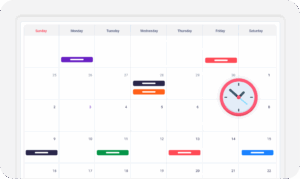
Book jobs, manage calendars, and reduce no-shows.

digital vehicle inspection software

Capture photos, videos, notes, and findings.

auto repair estimating software

Build quotes with labor, parts, and pricing.

repair order software

Convert approved work into organized repair orders.

auto repair invoicing software

Generate invoices from completed labor and parts.

auto repair job board software

Track jobs, assign technicians, and monitor progress.

Why Auto Repair Shops Choose Torque360

A Modern Way to Run Auto Repair Shops

Torque360 helps repair shops cut admin work, win more approvals, and keep every job moving, all in one connected workflow.

Build Estimates in Minutes

Use VIN lookup, canned services, and real-time pricing to quote fast and consistently.

Get Paid Faster

Send invoices by text or email, accept card and digital payments, and close jobs in minutes.

Show Customers the Problem

Attach photos and videos to estimates so customers approve recommended work.

Track Every Dollar

See real-time reports on revenue, margins, productivity, and cash flow.

Run Your Shop From Anywhere

Cloud-based access means you check in on your shop from the bay, the counter, or the road.

Run Your Whole Shop From One Platform

Stop managing spreadsheets, paper job cards, and disconnected tools. Torque360 brings every feature your repair shop needs into one connected system, at one predictable monthly price.

  • 20+ features in one platform

  • Plans from $99.99/month

  • Data migration from your current system

Frequently Asked Questions

Torque360 includes 20+ auto repair shop software features: Digital Vehicle Inspections, Appointment Scheduling, Estimates, Repair Orders, Invoicing, POS, Technician App, Labor Guide, Inventory Management, Integrated Parts Ordering, Integrated Payments, Customer Management, and Advanced Reporting, all in one platform from $99.99/month.

Torque360 is fully cloud-based. There is nothing to install. Sign in from any laptop or tablet with an internet connection. Your data syncs in real time across every device your team uses.

Yes. Torque360 is built for single-bay shops, mobile mechanics, multi-bay operations, and specialty repair businesses. The same features are available at every plan level, so small shops get the full system at $99.99/month with no feature gating.

Yes. Torque360 combines scheduling, DVI, estimates, repair orders, invoicing, POS, payments, inventory, and reporting in one system. Most shops switching to Torque360 retire 3-5 separate tools and save on monthly software costs.

Yes. Torque360 connects to QuickBooks for accounting, plus PartsTech and NexPart for parts ordering, CARFAX for VIN lookup, Epicor by Mitchell1 for labor guides, Twilio for SMS, and Brevo for email campaigns.

Yes. Torque360 includes data migration. Our team transfers customer records, vehicles, parts, and supplies from your current system so you start with a complete database and no manual entry.

Yes. Technicians use the mobile Technician App for clocking in and out, time tracking, and job updates. Service writers and owners can manage the full shop from a phone or tablet through the cloud-based platform.

Torque360 starts at $99.99/month with every core feature included. Annual plans get a 10% discount. There are no per-user fees on most auto repair software features.

Every shop gets a dedicated onboarding specialist, free data migration, training videos, and ongoing chat and phone support. Operational hours are 7:00 AM to 4:00 PM Pacific, with urgent matters covered outside those hours.

Yes. Book a free demo, and our team will walk you through the shop management software features that matter most for your shop type: auto repair, tire, motorcycle, RV, truck, mobile mechanic, or specialty repair.