Auto Repair Reporting Software

Know What Your Shop Made Before the Month Closes

Filing sales tax means rebuilding the figures job by job in most shops, and how the month actually went stays unclear until a bookkeeper closes the books. Torque360 auto repair reporting software compiles sales tax, day-end totals, order activity, and revenue straight from the repair orders your team already writes, so the numbers are waiting whenever you go looking for them. Trusted by 1,000+ repair shops across the auto, truck, motorcycle, RV, and powersports industries.

  • Sales tax by invoice, taxable and non-taxable split

  • Day End totals covering sales, tax, and payments

  • An all order report covering every workflow stage

  • Optional columns for RO/QCO, customer, parts tax

  • Filter any period and export it for your bookkeeper

Auto Repair Software with Reporting & Statistics
How It Works?

How Does Advanced Business Reporting Work
in a Repair Shop?

Torque360 advanced business reporting for auto repair reads the records your shop already creates. Every repair order, tax class, and collected payment feeds the reports on its own, so nothing is entered a second time to make a number appear.

Write the Work on the RO

Parts, labor, fees, and services go on the repair order or quick checkout as the job is quoted. That record becomes the source every report on this page reads from.

Apply Tax at the Line

Your tax class settings decide how tax lands on each part and labor line. Parts and labor stay separated, which is what the sales tax report reads when it splits totals.

Close the Invoice

When the repair order becomes an invoice and payment is collected, the transaction is finalized and stamped with the identifiers every report later sorts and filters on.

Watch Reports Compile

Every report on this page rebuilds itself continuously as jobs close through the day, which is why the totals move while the shop is still open rather than after a month-end close.

Filter and Export the Period

Pick a date range, switch on the fields you want, and review the totals on screen. Export the finished period for whoever keeps your books each cycle.

Integrate Your Entire Workflow

What Reports Does Torque360 Give a Repair Shop?

Torque360 covers four report families: sales tax, daily sales activity, repair order throughput, and revenue against cost. All four sit inside one repair shop reporting dashboard, so an owner reads them together instead of opening four separate tools.

The sales tax report for repair shops puts every job’s tax position on a single row. It answers the filing question without anyone opening invoices one at a time.

Day End reporting closes out the day with sales, tax, and payment totals in one summary. Owners see the day’s result before locking up instead of the following week.

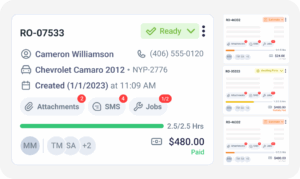
The all order report tracks repair orders through inspection, estimate, in progress, awaiting parts, and completed. Read as a repair order value report, it shows where money is currently parked.

A revenue and cost report gives the high-level view of what came in against what the work cost. For margin by service and technician, see Profitability Reporting.

How Does the Auto Repair Sales Tax Report Work?

The auto repair sales tax report gathers every invoice inside a date range and reports its taxable sales, non-taxable sales, and tax collected. Sales tax reporting for auto repair shops becomes a filter and a read rather than an evening spent with a calculator.
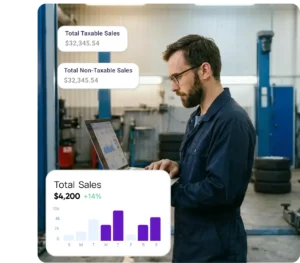
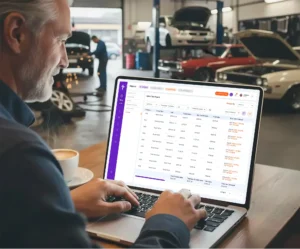
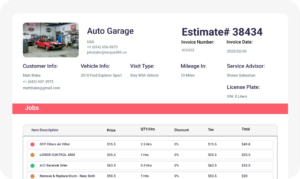
Invoice ID, invoice type, and date identify the job, and the sales and tax figures sit alongside them. A single row tells you everything worth knowing about one transaction.

You track taxable and non-taxable sales as two separate columns rather than one blended figure. Shops selling a mix of parts work and pure labor see where each dollar landed.

The total tax collected report adds up what the shop actually took in across whatever dates you select. That figure is the number a filing gets built from.

A quick checkout sale and a three-day diagnostic job produce identical row structures. Consistency is what lets a bookkeeper reconcile a full quarter without stopping to ask about formatting.

How Do You Track Tax on Parts vs Tax on Labor?

Torque360 reports total tax on parts and total tax on labor as separate figures because most states treat them differently. Parts are generally taxable. Repair labor is exempt in many states, but usually only when it is stated on its own line.

Several states only exempt repair labor when the invoice lists it apart from parts. Torque360 keeps parts and labor on separate lines, which is the invoice condition those rules depend on.

Switch on total sales, total tax on parts, and total tax on labor to see which revenue stream generated which tax. Tire-heavy and parts-heavy shops read very different splits here.

Enable repair order and quick checkout references so any tax figure traces back to the job that produced it. Useful when a number looks wrong, and someone has to find out why.

Turn on customer names when a fleet account or a repeat customer disputes a tax line. The answer is in the report instead of a folder of paper invoices.

Which Columns Can You Add to a Report?

Reports open with a readable default set and expand only where you ask them to. Customizable, exportable reports let each shop match the output to whoever reads it, whether that is an owner scanning totals or a bookkeeper reconciling a quarter.
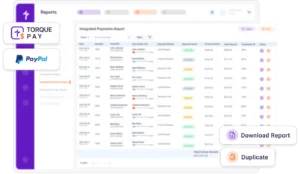
RO and QCO references, customer name, total sales, tax on parts, and tax on labor are all optional. Leave them off, and the report stays short enough to read quickly.

Run a day, a week, a filing quarter, or a full year without waiting for a scheduled period to end. Metrics and reporting for auto repair software should follow your calendar.

Past periods stay searchable and exportable, so year-end work and record requests do not send anybody back through a year of closed invoices one job at a time.

Export the period instead of granting portal access to somebody outside the shop. What leaves the system is the same set of figures you just read on screen.

Know How the Month Is Going 
Before It Ends

See how Torque360 auto repair software with reporting and statistics builds sales tax, day-end, and order figures out of the jobs your team is already writing every day.

Built to Power Entire Auto Shop Operation

How Soon Can You See the Day’s Numbers?

Immediately, and that timing is the whole point. Shops rarely lack data. They receive it after the moment it could have changed a decision, which is what we call the Three-Lag Reporting Problem, and real-time shop reporting shortens all three.

Most owners learn how a day went the next morning, once the pricing and staffing calls are already behind them. Day End reporting moves that read to before closing time.

Revenue and cost figures usually surface after a monthly close, weeks behind the decisions that shaped them. Watching them mid-month is what makes a correction still worth making.

Tax positions tend to get calculated the week a filing is due. Pulling the same figures in week three of a quarter turns a deadline into a routine check.

Which Torque360 Report Answers Which Question?

Torque360 runs several reports, and each one owns a different question about the same jobs. Knowing which screen answers what saves an owner from reading the wrong report and drawing a conclusion it was never built to support.
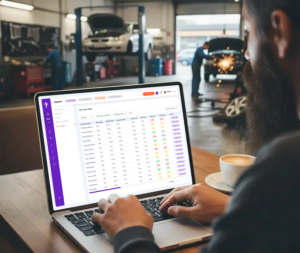
Questions about labor margin, parts margin, and technician output belong to profitability reporting. The reports on this page cover what was sold and taxed, not what any of it earned.

How money arrived and what is still outstanding belong to payments reports and receivable accounts. Those screens follow the cash side of a job once the invoice has gone out.

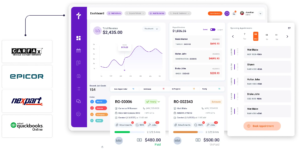
Ledgers, reconciliations, and financial statements stay in your accounting software. Torque360 passes invoices and payments across so both systems end up reading from the same set of transactions.

Why Choose Us

Who Gets the Most Out of Advanced Reporting?

Reporting depth is worth paying for at some job volumes and not at others. Advanced business reporting for auto repair proves itself once a shop produces more transactions in a week than one person can carry in their head.

Shops That File Every Cycle

Monthly and quarterly filers repeat the same reconstruction job on a schedule. Pulling an audit-ready sales tax report for any date range supports sales tax compliance for auto shops without that rebuild.

Shops Heavy on Parts Sales

Parts and tire volume drive most of a shop’s taxable sales. Seeing tax on parts apart from tax on labor shows which side of the shop is generating the liability.

Owners Who Check In Weekly

A weekly review only functions if weekly figures exist to review. Live reporting supports that shorter cycle, which is where most operational corrections in a shop actually get made.

Shops Better Off on Starter

A solo mechanic writing a handful of jobs a week gains little from the advanced tier. Standard business reporting on Starter covers sales and tax visibility until volume grows.

What Feeds the Numbers on Every Report?

Reports carry no data of their own. Every figure in this auto repair shop analytics software comes from estimates, quick checkouts, repair orders, payments, and invoicing, which is why a total on-screen traces back to the job behind it.
appointment-booking-widget

Book jobs, manage calendars, and reduce no-shows.

digital vehicle inspection software

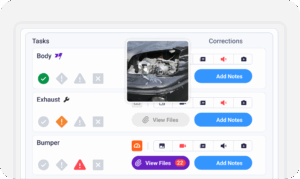
Capture photos and videos. Add notes and findings.

auto repair estimating software

Build accurate estimates with labor, parts, and pricing.

repair order software

Convert approved work into organized repair orders.

auto repair invoicing software

Generate invoices from completed labor and parts.

auto repair job board software

Track jobs, assign technicians, and monitor progress.

Does Reporting Work for Every Shop Type?

Taxable parts and non-taxable labor land in different proportions depending on the work a shop takes in. The same auto repair reporting software reads all of it through identical fields, from a one-van mobile operation to a multi-location group.

Mechanic Shop

Motorcycle Repair

Truck Repair

Oil Change

Tire Repair

Mobile Mechanics

Case Studies
Shops That Stopped Guessing at Their Numbers

Repair shops use Torque360 to shorten month-end, prepare filings without rebuilding records, and read the day’s performance while the day is still running. These stories cover what changes once the figures arrive early enough to use.

Artur Pires, Owner at Mapgreen Motorsports
Mapgreen Motorsports

"Torque360 changed everything for us. On long projects, nothing gets lost anymore. Labor, parts, approvals, it’s all there. Since using it, I haven’t lost a single cent."

View Story

75%
Missed Revenue Prevented
2x
Increase in Project Visibility
Cauy Cuthbertson, Owner at Charles Garnett
Charles Garnett

“Torque360 has everything I was looking for. From scheduling and tracking jobs to QuickBooks Online integration and Torque Pay, it helps me stay organized.”

View Story

8+ Hrs
Saved on Daily Operations
100%
Same-Day Invoicing with TorquePay
Himel, Owner at Halal Auto Care
Halal Auto Care

"We were doing estimates and tracking jobs manually, and it caused delays and confusion. Now with digital estimates and invoicing, everything is faster and more organized."

View Story

50%
Faster Estimate & Job Processing
1.2x
Higher Customer Capacity
Shop owner video testimonial
Tire & Wheel Xperts

“Torque360 makes everything easy, efficient, and professional. Each invoice only takes about one to two minutes now. I recommend it 100%.”

View Story

1-2 min
Invoice Creation Time
95%
Automated Inventory Sync
Shop owner video testimonial
Cauy Cuthbertson

"Torque360 helped us bring everything into one place. Jobs, parts, and invoices are easier to manage, and the shop runs more smoothly day to day. It gives us the structure we needed."

View Story
100%
Centralized Shop Workflows
2x
Boost in Operational Efficiency

Put Your Shop’s Numbers Where You Can See Them

Torque360 auto repair reporting software keeps sales tax, daily totals, and order activity in one place, recalculates them as jobs close, and ties every figure to a repair order.

  • Sales tax figures ready for any filing period

  • Day End totals ready before your team locks up

  • Order activity tracked across every workflow stage

  • Columns, date ranges, and exports you control

Frequently Asked Questions

Four cover most of what an owner needs: a sales tax report for filings, Day End reporting for the daily close, an all order report for throughput, and a revenue view for what the work returned. Margin detail comes from profitability reporting and collection detail from payments reports once those four are routine.

Each row carries the invoice number, invoice type, date, taxable sales, non-taxable sales, and tax collected. Optional columns bring in the RO or QCO number, who the customer was, total sales, and how tax broke down between parts and labor. Those columns stay hidden by default so the standard view stays readable.

Tax class settings apply the treatment at the line item, and the report then presents both figures as separate columns on every invoice row. Because parts and labor occupy different lines, each stream’s tax totals independently. No sorting or tagging is needed at filing time.

It varies by state. Parts are taxable everywhere a sales tax exists, while repair labor is exempt in most states, generally on the condition that it appears separately on the invoice. Around twenty states tax the full repair charge. Check your own state’s position with your accountant.

In much of the country, no, as long as labor is billed on a separate line from parts. New York taxes the whole repair charge, and several states tax particular categories such as fabrication labor. Treat this as a state-level question and confirm the answer with your accountant.

Yes. Figures recalculate as repair orders, quick checkouts, and payments are processed, so what appears reflects the day so far rather than yesterday. Day End reporting handles the daily close, and any date range can be pulled on demand. Nothing waits for an overnight process.

Yes. Any period can be searched, filtered, and exported, which is how most shops send figures to a bookkeeper without handing over portal access to the whole system. Historical periods remain available, so year-end reconciliation and record requests do not mean reopening closed invoices one by one.

No. Torque360 reporting stays in Torque360. What syncs to QuickBooks Online is your invoices and payments, so those transactions post automatically instead of being keyed in twice. QuickBooks then builds its own financial reports from that data, independent of Torque360.

It produces the records an audit typically asks for in a consistent format somebody can reconcile and hand over. Whether a filing is correct still rests on tax classes being configured properly for your jurisdiction, which is a question for your accountant rather than a claim software should make.

Advanced Business Reporting covers sales tax, day-end totals, order activity, and revenue. Profitability reporting covers margin by service and technician. Payments reports cover how money was collected, and receivable accounts track balances still owed. Each report is built to answer one of those and not the others.

Advanced Business Reporting comes with the Turbo and Supercharged plans, and reporting across multiple locations is part of Supercharged. The Starter plan, at $99.99 per month or $89.99 per month billed annually, includes standard Business Reporting, which covers everyday sales and tax visibility for smaller shops.