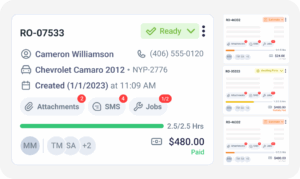
Auto Repair Payment Reporting Software

See Every Payment Your Shop Collected in One Report

Auto repair payment reporting software gives you one place to see every transaction your shop collected, no matter how the customer paid. Torque360’s All Payments Report pulls cash, card, and digital payments into a single view and keeps each transaction linked to the invoice or RO it settles. Trusted by 1,000+ independent repair shops across auto, truck, motorcycle, RV, and powersports.

  • Every transaction in one consolidated report

  • Payment method, status & amount on every record

  • Each payment tied to invoice or repair order

  • Invoices & payments already syncing to QuickBooks Online

How It Works?

How Does the All Payments Report
Actually Work?

The payments report turns every closed transaction into a searchable, exportable record. You open the report, filter it, and either work from it in the platform or export it for accounting. The report reads the same records your service advisors already close on, so nothing needs to be entered twice.

Open the All Payments Report

Open the payment report from the reporting area inside Torque360. The default view shows every transaction the shop has collected across the selected date range, sorted by most recent, so month-end reconciliation starts on the right page.

Review Each Transaction’s Record

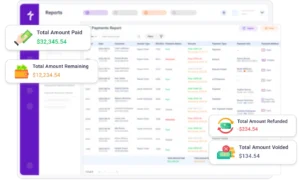
Each row on the report includes the payment method, the payment status, the amount, and the invoice or repair order reference the payment applies to. No transaction sits on the report without the context a bookkeeper needs to reconcile it.

Filter by Method, Type, Customer, or Date

Filter the report by payment method, by payment type (payment, refund, or voided), by invoice type (RO or quick checkout), by customer, or by date range. Pull a card-only view for a bank deposit, isolate every refund from last week, or check one customer’s account.

Reconcile to Invoices

Work through the report line by line at month-end. The invoice or RO reference sitting on each row is what turns reconciliation from a rebuild of the month’s activity into a review of what was already recorded the first time correctly.

Export for Accounting

Export the report when a bookkeeper needs a file or a period summary outside the platform. The exported version is a downloadable record that can be handed off to accounting, filed in the shop’s records, or attached to an audit request.

Integrate Your Entire Workflow

What Does the All Payments Report Show You?

A payments report is only useful if you can trust it to cover everything the shop collected. Transaction reporting for auto shops depends on one condition being true: nothing lives outside the report. Torque360’s All Payments Report is built to hold that condition, so cash, card, and digital transactions all land on the same view your team already works from.

The consolidated view of all payments lists every transaction the shop collected across cash, card, and digital in one report. If a payment cleared inside Torque360, it appears here. Owners and bookkeepers work from one source of truth rather than reconciling three separate terminal summaries into a fourth at the end of every month.

Each row is a self-contained record: who paid, how, the transaction’s status, the amount, and the invoice or RO it settles. That structure turns the report into something reconciliation can run from, because every question about a payment is answered on its own line.

The report covers whatever date range you select, from a single day to a full year of shop activity. Owners run it at the end of the day for a shift close, at the weekend for a cash flow review, and at the end of the month for reconciliation. The same report answers all three questions without switching views.

Shop owners read it for cash flow visibility, bookkeepers read it for reconciliation, and service managers read it to spot exceptions. One report answers the money question for three different roles inside the shop, instead of each role pulling numbers from a separate terminal summary or manual export at month-end.

How Do You See Payment Method and Status?

Not every payment ends up in the same state, and the ones that clear do not always stay that way. The payment method breakdown, the payment status column, and the split totals at the report footer are what separate a real transaction report from a summary that folds partial payments and reversals into one number.
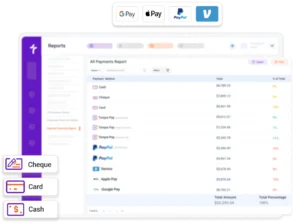
The report shows payments by method (cash, card, check, and digital wallets), so the mix is visible at a glance. A customer who paid cash yesterday and swiped a card today appears with both transactions, each row clearly labeled. Owners who could not previously name their cash-versus-card split can name it here.

Payment status shows whether a transaction is paid, refunded, voided, or in a combined state such as refund-voided or payment-voided. Shops watching for reversals read this column first, because a report that folds them into the paid total overstates cash flow. The footer keeps those totals separate, so reversals never disappear into the paid figure.

The Amount column stacks two figures on every row: the amount paid on this transaction and the remaining balance on the invoice. A partial payment shows the amount paid vs. amount due together, so a customer who paid half of a repair invoice appears tied to the same RO, with the remaining balance visible on the row.

How Do You Reconcile Payments to Invoices?

Reconciliation is where a shop’s numbers either hold together or start to drift. How to reconcile payments to invoices without a manual spreadsheet is one of the first questions a bookkeeper raises when a shop starts looking at software, because the manual version eats hours and hides errors when it goes wrong. Payment reconciliation reporting on this page is built to remove the spreadsheet in the middle.

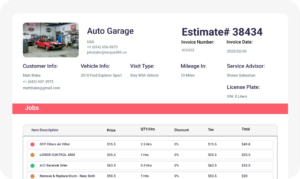
Every payment on the report carries the invoice, repair order, or quick checkout reference it applies to. The reference is captured when the payment is recorded, so no orphan transaction sits on the report waiting for someone to remember where it came from. A shop that mixes full ROs with fast POS-style sales still sees one clean report instead of two systems’ worth of data.

When an invoice’s expected amount does not match what was collected, the report surfaces both amounts on the same row rather than filing the discrepancy silently. This is how a shop catches a mischarge, a short payment, or a partial payment that would otherwise slip through into the next month as quiet leakage.

Torque360 provides two integrated payments reports, one for TorquePay through BlockChyp and one for PayPal. Each isolates a processor’s activity: cardholder info, the card-present or card-not-present or payment-link breakdown, the transaction ID, and the paid vs. total amount. The full picture across every method sits on the All Payments Report.

How Does the Payments Report Connect to QuickBooks?

The payments report and QuickBooks are two viewing surfaces on the same shop activity, one on the shop floor and one in the accounting stack. What connects them is the invoice and payment sync, not a report feed running between the two. That distinction is what keeps the two views in agreement without any data being pushed twice.

The report itself does not sync; the underlying invoices and payments do. Every closed transaction in Torque360 posts to QuickBooks Online, and QuickBooks builds its own reports from that transaction data. What Torque360 shows on the All Payments Report and what QuickBooks shows on its side are drawn from the same source.

The payments report is exportable, so you can hand a bookkeeper a file whenever they want one outside the QuickBooks view. Exportable payment reports are useful for period reviews, external audits, or any moment the accountant needs a standalone record from the shop side without touching the QuickBooks sync.

Deeper QuickBooks accounting sync happens through the integration itself, which posts each invoice and payment to your chart of accounts as configured during setup. The QuickBooks integration page covers the OAuth connection, the chart of accounts field mapping, and exactly what data posts to QuickBooks the moment a transaction closes.

For a shop with the QuickBooks integration connected, a bookkeeper who prefers QuickBooks reads the same transactions from the QuickBooks side without shop staff exporting anything. An owner who prefers the shop-floor view works from the All Payments Report. Neither role blocks the other, because both are reading the same records.

You Collected It. Now You Can Actually See It.

Money comes into a repair shop through cash, card, and digital tools that do not always talk to each other. The All Payments Report pulls every one of those transactions into a single record, so month-end reconciliation and cash flow visibility stop depending on manual assembly from three separate summaries.
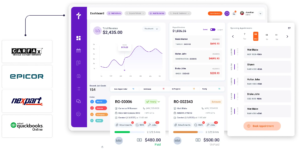
Built to Power Entire Auto Shop Operation

Why Choose Us

Why 1,000+ Independent Repair Shops Run Auto Repair
Payment Reporting Software

See why shops move payment reporting into their shop management system instead of piecing it together from cash drawers, card terminal exports, and spreadsheets

Website & Optimization

One report across every method

Cash logs, card terminal records, and digital payments land on one report the shop owner reads once, with no manual reassembly at day, week, or month-end.

Tracking and Reporting

Linked to every invoice and RO

Reconciliation runs off the report itself, not a separate spreadsheet on the side. When a payment is on the report, the invoice it settles is on the same row.

Plan and Strategy

Method and status on every row

Every row shows how the customer paid and how the transaction ended: cleared, refunded, or voided. Partial payments and reversals appear as themselves, not folded into a summary total where quiet leakage usually lives.

Continuous Optimization

Exports for accounting or audit

When a bookkeeper wants a file for accounting, the report exports on demand. When an audit asks for a period record, the same export answers without a separate build.

Continuous Optimization

Mirrored to QuickBooks Online

Every payment on the report is one of the invoices and payments syncing to QuickBooks Online through the integration. Nothing is entered twice, nothing lives on a separate list.

How Does the Payments Report Connect to the
Rest of the Shop Workflow?

The payments report reads across the same records that run the shop floor. Every module below writes to the transaction data the report displays.
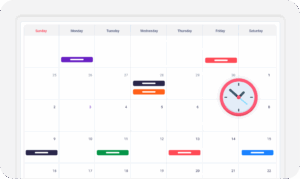
appointment-booking-widget

Book jobs, manage calendars, and reduce no-shows.

digital vehicle inspection software

Capture photos and videos. Add notes and findings.

auto repair estimating software

Build accurate estimates with labor, parts, and pricing.

repair order software

Convert approved work into organized repair orders.

auto repair invoicing software

Generate invoices from completed labor and parts.

auto repair job board software

Track jobs, assign technicians, and monitor progress.

Which Repair Shops Rely on the Auto Repair Payment Reporting Software?

Payment reporting matters wherever payment volume outgrows a manual reconciliation habit, and that threshold shows up faster in shops running mixed payment methods and multiple job types than in a one-technician shop taking cash. The All Payments Report scales with volume rather than forcing a shop to change how it works.

Mechanic Shop

Motorcycle Repair

Truck Repair

Oil Change

Tire Repair

Mobile Mechanics

Case Studies

How Independent Shops Track Payments on Torque360

Real shops running their daily operations on one connected platform, from repair orders and invoicing to payment collection and reconciliation. These stories show how one consolidated view of payments turns month-end from a rebuild into a review.

Artur Pires, Owner at Mapgreen Motorsports
Mapgreen Motorsports

"Torque360 changed everything for us. On long projects, nothing gets lost anymore. Labor, parts, approvals, it’s all there. Since using it, I haven’t lost a single cent."

View Story

75%
Missed Revenue Prevented
2x
Increase in Project Visibility
Cauy Cuthbertson, Owner at Charles Garnett
Charles Garnett

“Torque360 has everything I was looking for. From scheduling and tracking jobs to QuickBooks Online integration and Torque Pay, it helps me stay organized.”

View Story

8+ Hrs
Saved on Daily Operations
100%
Same-Day Invoicing with TorquePay
Himel, Owner at Halal Auto Care
Halal Auto Care

"We were doing estimates and tracking jobs manually, and it caused delays and confusion. Now with digital estimates and invoicing, everything is faster and more organized."

View Story

50%
Faster Estimate & Job Processing
1.2x
Higher Customer Capacity
Shop owner video testimonial
Tire & Wheel Xperts

“Torque360 makes everything easy, efficient, and professional. Each invoice only takes about one to two minutes now. I recommend it 100%.”

View Story

1-2 min
Invoice Creation Time
95%
Automated Inventory Sync
Shop owner video testimonial
Cauy Cuthbertson

"Torque360 helped us bring everything into one place. Jobs, parts, and invoices are easier to manage, and the shop runs more smoothly day to day. It gives us the structure we needed."

View Story
100%
Centralized Shop Workflows
2x
Boost in Operational Efficiency

One Report for Every Payment Your Shop Collects

Every payment your shop collects lands on a report your team already trusts, mirrored to the same data that runs to QuickBooks Online. Reconciliation gets faster, cash flow gets readable at a glance, and the bookkeeper stops chasing numbers across three tools to close a month.

  • One consolidated report across every payment method

  • Reconciliation tied to the invoice or RO

  • Exportable when a bookkeeper needs a file

  • Same records already syncing to QuickBooks Online

Frequently Asked Questions

A payments report, sometimes called a payment history report for auto repair shops, is a single running record of every transaction a shop has collected, organized so each entry stands on its own. It captures how the payment was taken, whether it cleared, how much it settled, and against which invoice or RO. In Torque360, this record is the All Payments Report.

The payments report shows what has been paid. Receivable accounts, sometimes called accounts receivable, show what is still owed. When a customer settles an outstanding invoice, the transaction moves from receivables onto the payments report. Both reports draw on the same customer and invoice data and live on separate pages inside Torque360.

No. The payments report is a reporting view, not a payment processing tool. Taking payments happens through TorquePay, Torque360’s built-in payments tool, or through the PayPal integration. The payments report reads across what those tools collected.

Yes, on export: the report downloads as a file whenever a bookkeeper wants one. No on-report sync: the report itself does not flow to QuickBooks, but the invoices and payments behind it do, through the QuickBooks integration. That is why the shop-side view and the QuickBooks view stay consistent without a separate feed running between them.

The report filters by payment method, by payment type (payment, refund, or voided), by invoice type (repair order or quick checkout), by customer, by invoice ID, and by date range. When shops filter payments by method or status, they cover the questions asked at shift close, at bank deposit, and at month-end review, from a card-only view of last Friday to every refund a specific customer has ever received.